Version 2.2
Adds support for coloring binary hex dumps using the Binary Protocol Documentation Standard, a new out going hex panel, user defined speeds to comport settings, a record button to the bind keys settings, an option to add a line feed when a carriage return is received.
Features
Added support for the Binary Protocol Documentation Standard
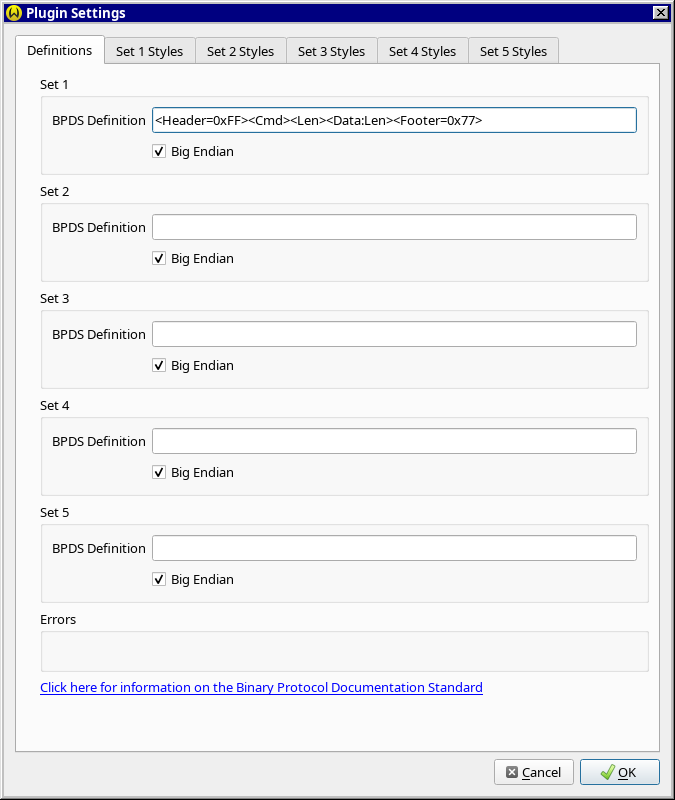
The Binary Protocol Documentation Standard (BPDS) is a way to describe the
format of a binary protocol. It breaks the bytes down into fields and
WhippyTerm can now apply coloring to the binary hex dump by using
a BPDS definition string.
A BPDS definition string looks something like:
<Header=0xFF><Cmd><Len><Data:Len><Footer=0x77>
What this means is that your protocol starts with a byte set to 0xFF,
followed by a command byte, length byte, and then the data (which will be
'Len' bytes in length). This is followed by a 0x77 as a trailing byte.
So 0xFF 0x01 0x3 0xAA 0xBB 0xCC 0x77 would be a valid packet on the
serial connection.
With the new support for BPDS in the binary hexdump WhippyTerm can now
color the hex dump like:
0xFF
0x01
0x03
0xAA 0xBB 0xCC
0x77
The definition strings can be set in Settings->Terminal->Data Processing->Binary->Hexdump->Settings.
Added new out going hex panel
In the bottom panel there was a tab for showing the hex data. This panel
only showed incoming bytes. A new tab has been added to show data sent
out of WhippyTerm and the older tab was renamed "Incoming Hex".
User definable speeds added
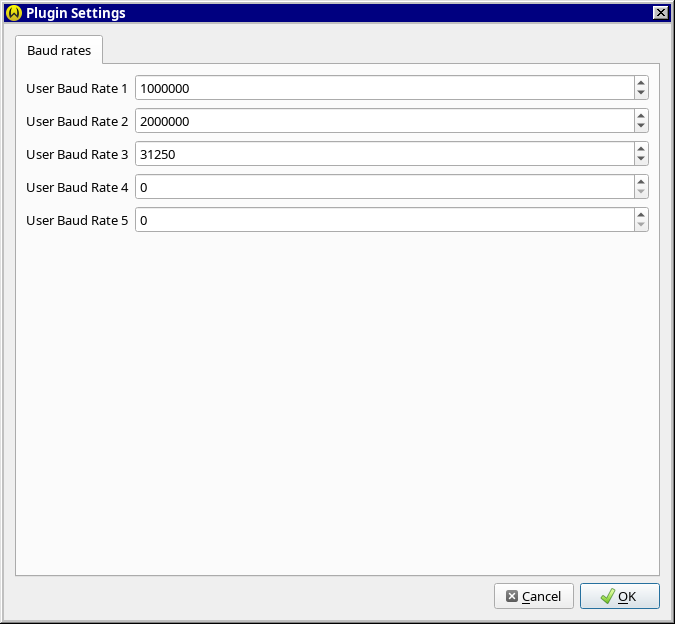
For comports the user can now input custom baud rates that will show up in
the new connection dialog. This way you no longer have a open a connection
with the wrong baud rate and edit the URI.
New option to add a line feed when a carriage return is received
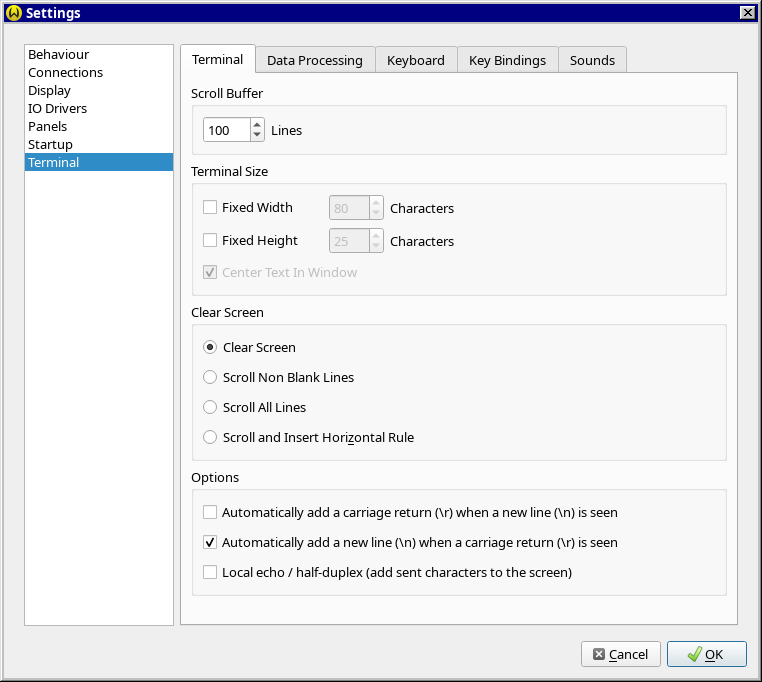
A new option has been added to the Terminal settings that will have
WhippyTerm automatically add a a new line when it sees a carriage return
on the incoming byte stream.
Full list of changes
2.2.0.0 (11 Jan 2026)
- [Functionally fix] Changed side panels to have control together
Moved the controls on the side panels so that the start / abort and other controls are not at the bottom but are now grouped with the other controls.
- [Polish] Fixed a number of issues with Dark Mode
Not all widgets where drawn correctly when in dark mode.
- [Bug fix] Fixed a problem with the DPI not drawing the panels open/close bars correctly.
When running with a high-DPI the dot pattern was being stretched and making an odd pattern. This has changed to diable stretching when drawing the panel open/close bars.
- [Enhancement] Added error messages to the upload/download
The upload/download file transfer didn't show any errors, just quit the transfer. There are now error messages.
- [Enhancement] Added new options to xmodem tranfer
New options for start timeout, max NAK's before abort, and timeout between packets have been added.
- [Polish] Changed file transfers to auto open side panel
When the user selects a file upload/download the side panel is now opened.
- [Enhancement] Complete rewrite on auto reconnect system
Count not find a problem with the auto reconnect but have a bug report. Deleted and rewrote the auto reconnect to be a simpler system that uses less code (less code = less likely to mess up)
- [New Feature] Updated Binary HexDump to support Binary Protocol Documentation Standard strings
The settings for the binary hexdump data processor has been updated to let the user input a binary protocol documentation standard string that it will then use to color the incoming bytes.
- [Enhancement] Added new widget WebLink for plugins
A new widget for showing http links the user can click on.
- [Bug fix] Reset term didn't reset colors in binary mode
When you where in the binary mode selecting reset terminal didn't reset the current styling. It does now.
- [Enhancement] Added function to let plugins change a widgets label
Plugins can now change the label of a widget after it's been added to the display.
- [Enhancement] Added support code for columns
Support code was added to make it easier to add columns to the text display.
- [Enhancement] Added change property widget control
Plugins can now change the properties of widgets with the new change property functions. Currently only the font type of text box's can be changed.
- [Enhancement] Added new event for text input widgets
A new event for text input widgets has been added. The e_PIECB_TextInputEditFinished event is sent when the user moves out of text input (they are finished editing).
- [Enhancement] Added new style picker widget
A new style picker widget has been added to available widgets plugins can select from.
- [Enhancement] Added a save button to the hex panels
A new save button has been added to the incoming and outgoing bottom hex panels. The just saves the contents of the panel to a file as RAW binary data.
- [Bug fix] Fixed a bug where if a block of bytes came in it wouldn't add to hex panel
When a block of bytes came in and it was bigger than the size of the hex buffer it would just clear the hex panel instead of coping the last bytes.
- [New Feature] Added new out going hex panel
A new hex display was been added to the bottom panel. This new display shows the outgoing bytes in hex the same as the incoming hex panel does. The Hex panel has also been renamed to incoming hex.
- [Enhancement] Added menu entries to open/close the panels
New menu options where added to the view menu to show the status and let you control if the panels are open or closed. You can also bind the open/close to the a key press.
- [Bug fix] Mouse over for panels wasn't working. Fixed
When you move the mouse in and out of a side panel the panel should highlight. This was broken and has been fixed.
- [Enhancement] Added comport settings for user speeds
Added settings for the comport to let the user add their own baud rates.
- [Enhancement] Added settings to IO Drivers
A new settings area has been added where IO Driver plugins can now have settings like the Data Processors can.
- [Functionally fix] Added record button to bind keys
Added a record button to the bind keys that will now record key presses and fill in the key seq. Also fixed an error message if the key seq is not understood. The list of commands is now sorted.
- [Functionally fix] Changed how insert horizontal rule works
Horizontal Rule cleared the current line and then changed it to a horizontal rule. Now it checks if the line is blank and if not moves to the next line and then inserts a horizontal rule.
- [Enhancement] Added setting for tab size
You can now set the tab size to something other than 8 spaces.
- [Enhancement] Added new settings to the ANSI decoder
Added settings to turn on/off bold,italic,underline, intensity, double underline, and overline
- [Enhancement] Added an option to add a line feed when a carriage return is received
An option was added in settings so that the system will automatically add a new line (\n) when a carriage return (\r) is seen
2.1.0.0 (29 Oct 2025)
- [Functionally fix] Show line ends now show CR/LF
Show end of lines now shows the marks + a CR,LF,CRLF,or LFCR at the end of the line. This does not show the control chars that came in but instead shows a "guess" of what WhippyTerm things was the line ending. This is because the cursor moves between the first control char coming in and the second control char, making it a mess if you put the chars where they came in.
For this reason WhippyTerm now just tracks if CR/LF come in and adjusts a guess at what ended the line. If the user moves the cursor up to an already existing line it will adjust the existing line ending on that line even if the cursor was in the middle of the line.
- [Polish] Added double-click a word in term window selects it, triple-click selects line
The selection system was updated to support double click and triple click. This does not apply to binary display.
- [Enhancement] Added a "are you sure" popup on quit
When you close WhippyTerm it will now prompt to make sure you are sure if there is one or more open connection tabs.
This function can be turn on/off in the settings.
- [Enhancement] Added a restore connection on startup option
A new setting has been added that will reopen the connection tabs that where open then WhippyTerm quits. It will store this info in the session data, and includes any custom settings applied to the connection, if the connection was open or closed, any connection options.
- [Functionally fix] Updated ANSI decoder to support Page Up/Down
The ANSI decoder was not sending page up, page down, home, end, and insert. It has been updated to send these.
- [Enhancement] Added cursor key modes
A need mode was added called cursor key mode. It sets how the cursor and other movement keys (like the page up and down) work. When cursor key mode is "send" then pressing the cursor keys sends out control codes on the connection (what control codes depends on active data processor). When switched to "local" mode then cursor moves the window around and doesn't send anything out the connection. This is by default connected to the state of the Scroll Lock key.
- [Enhancement] Added new commands to move the view around
New commands where added that lets the user bind keys to functions to move the current view window around. The user can now move the view up/down/left/right, goto the top/bottom of the buffer, and page up and down.
- [Functionally fix] Changed bridging so you can bridge more than 2 connections
The bridging code has been updated to let the user bridge more than 2 connections. You make as many pairs as you would like.
- [Enhancement] Added new option for a destructive backspace
There is a new setting to change how the backspace works. If checked then instead of just moving the cursor, a space is placed over the cursor position. This is helpful if you have a prompt that supports editing but doesn't output a space to erase the char when doing a backspace.
2.0.2.0 (03 Oct 2025)
2.0.1.0 (30 Sep 2025)
2.0.0.0 (26 Sep 2025)
- [Polish] Fixed download/upload so you can't try to start a upload/download while the other is active.
If you started a download you could still goto the upload panel and start an upload (which wouldn't work out very well). This has been changed to lockout the others controls.
- [Enhancement] Added a menu item to copy the current selection to a send buffer
The user can now select some text and copy that text to a send buffer.
- [Bug fix] Fixed bug with selections in binary mode
When in binary mode the selection was showing up and disappearing randomly. There is there is selection was not be check so it was drawing random data as the selection. It has been fixed.
- [Bug fix] Added bookmark import/export
You can now export your bookmarks to a file and you can replace your bookmarks with the bookmarks from a saved file.
- [Bug fix] Added command line options
Added command line options when WhippyTerm is started from a CLI. You can now provide a list of URI's to open, or using the --bookmark option open a bookmark from available bookmarks.
A new help menu was added to explain the command line options.
- [Bug fix] Auto hide of panels made to work
The auto hide of panels was not implemented. You could turn on the option but it didn't do anything. Now when enabled clicking on the max text area or pressing select buttons in the panels will auto hide the panel and give focus to the text area.
- [Enhancement] A restart is no longer needed to uninstall a plugin
The plugin system was made more dynamic so you can install / uninstall plugins without restarting WhippyTerm. This also effects enable/disable plugin.
- [Enhancement] Added upgrade plugin
The only way to upgrade a plugin was to uninstall it and then reinstall it. A new button was added to the manage plugins dialog so the user can upgrade an installed plugin.
- [Enhancement] Added a calculate CRC dialog
A new calculate CRC dialog has been added. This will let the user input some hex data and calculate the CRC (for a selection) for that data. You can also select text in the main window and have it copied into the calculate CRC dialog. As with all CRC there is a button to generate source code to calculate the selection CRC type.
- [Enhancement] Added an select color button to the color settings
In Settings->Display->Colors you can input colors by Web # and sliders. A new button was added that you can press to use the color picker the same as with Cursor color.
- [Enhancement] Added an option to make portable version
Added an option to pull the settings and other files from the same directory as the exe. This will enable making a portable version that does not need to be installed (or needs admin rights).
- [Enhancement] Installing a data processor plugin will now enable it
When you install a new data processor plugin it will enable it in settings.
- [Enhancement] Server style IO plugins now start with "SRV_"
Server style IO plugins now should start their URI prefix with "SRV_" to show that they are a server. A server is a plugin that ways for a client to connect to it. This has been done to make things more consistant, so for example a TCP/IP server would now be SRV_TCP://localhost and the client would be TCP://localhost
- [Enhancement] Added an option to add a carriage return when a line feed is received
An option was added in settings so that the system will automatically add a carriage return (\r) when a new line (\n) is seen
- [Enhancement] Added option to do local echo
A new settings option has been added to do a local echo when sending data for half duplex connections.
- [Enhancement] Added the transmit delay to settings
You could set the send delay for a connection but it wasn't stored anywhere. A new setting has been added that lets you customize this for the system and have bookmarks store the setting.
an also just temperately for the current connection as well without changing the settings.
- [Enhancement] Moved the QT6 for GUI
Updated to QT6 for the GUI. This should add better support for display scaling (DPI).
- [Polish] Reworked custom connection settings menu work
Telling when a connection was using custom settings was not clear. The menu has been reworked to make it clearer.
- [Polish] Reworked how manage bookmarks dialog handles custom connection settings
The manage bookmarks dialog used push buttons to control if the bookmark was using custom settings or not. This was confusing and had no way to know if a bookmark was using custom settings or not. This has been reworked to use a checkbox that tells the user if a bookmark is using global settings or custom settings.
- [Enhancement] Added a plugin API to be able to freeze the display
Data processor plugins can now freeze the display so new text will not be added to the display until they release the freeze. The plugin can also clear any frozen text.
- [Enhancement] Added marks to data processors plugin API
Data processor plugins can now drop "markers" as data comes in. The plugin can now color/style from the mark to the cursor.
- [Bug fix] Fixed bug where selection would move if back buffer filled
When the back buffer filled and a new line was added the selection would change what lines where selected (the line would move up, but the selection would say on the old line making it look like the seleciton had moved).
- [Bug fix] Fixed bug where selection was being cleared when clipboard mode wasn't smart
The selection was being cleared when the selection mode was not set to smart clipboard.
- [Enhancement] Added new misc type of binary plugins
A new sub class of plugin has been added, you can now add binary misc types of plugins. These plugins show up in the misc area of the binary type of data processing.
- [Enhancement] Added a text box to the plugin UI API
Plugins can now add a text box to the widgets they can add for aux controls, options, and settings. These are displays for text. The text will wrap and can be selected for copy paste, but can not be changed.
- [Enhancement] Added a color picker to the plugin UI API
Plugins can now add a color picker to the widgets they can add for aux controls, options, and settings.
- [Enhancement] Added a groupbox to the plugin UI API
Plugins can now add groupbox to the widgets they can add for aux controls, options, and settings.
- [Enhancement] Made settings button work for plugins
In the settings dialog there is a settings button to configure a plugin. The button now works.
- [Enhancement] Added selection colors to settings
You can now pick the colors you want for selections in the main area (binary and text).
- [New Feature] Added a new find CRC dialog
You can now input some data and input a CRC value for that data and have it analyzed. The system will then tell you the CRC algorithm that will make that CRC given that data.
- [Enhancement] Changed copyright message for generated code
The copyright message has been changed when code is generated. The old message was a copyright message saying you had to copy the message. The new one just says do what you want but don't blame me.
- [New Feature] Added support for a file requester to the UI API
A new API was added so plugins can prompt the user for a filename and path
- [Enhancement] Added quick jump for CTRL-C handling
A new menu option was added to the settings menu to let the user jump to the clipboard (CTRL-C) handling settings.
- [New Feature] Added user styling/color of the selection
The user can now style or change the background color of the selected text. This allows the user to highlight text of interest. This is most useful in binary mode as they can select different messages or parts of a packet and highlight them. Bold, italics, underline, strike through, and the background color can be changed.
- [Enhancement] Updated send block panel to support hex
Added a hex input to the send block panel on binary and block connections. A hex input with edit button (that goes the send buffer dialog) was added to the panel as well as input for what to send at the end of a text block. The user can select from:
- [Bug fix] Fixed bug where binary display doesn't stop the cursor from blinking
When using the binary decoder if the main text area loses focus the cursor should stop blinking. It wasn't
- [Polish] Added a help button to URI input
A new help button was added after the URI input on the main window. This button opens the open connection using URI dialog and fills in the URI from the main window. It also selects the drive matching the URI.
- [Polish] Changed menu buffers to use send buffers name instead of static text
In the main window "Buffers" menu the 12 shortcut buffer entries have been renamed to include the buffers name.
- [Polish] Added a set setting to defaults menu option
Under the Settings menu a new menu item was added that lets the user set settings back to defaults.
1.1.0.0 (29 Jun 2025)
- [Bug fix] Fixed a bug with screen DPI settings on Windows
When you set the DPI something other than 96 (scale %) then selecting text did not work correctly. This (hopefully) has been fixed.
- [Bug fix] Fixed a bug with binary displays not ignore attribs that are turned off
You can suppress drawing of different attributes in the settings. In text mode changing this hide that attribute, but in binary mode the attribute was still drawn. This has been fixed.
- [Enhancement] Added Lock window scroll when not on bottom line
When the scroll bar is at the bottom the screen will be scrolled to the bottom when new text is added. If the scroll bar is not at the bottom it will say at it's current display.
- [Enhancement] Improved open errors dialog with OS messages
When an open connection fails the user is now prompted with and error message. This message can include more details from the plugin.
- [Enhancement] Added option to auto reconnect when a connection is closed
A new feature was added that will auto retry opening a connection if it fails to open. A setting was added to say if this should be done and how long to wait between tries. This can be set per-connection and toggled with a menu option under the connection menu.
- [Enhancement] Extended plugin API so data processor plugin's can see bytes sent
The data processors API has a new callback function that will be called when data is send out of a connection. See ProcessOutGoingData().
1.0.4.0 (31 May 2025)
- [Bug fix] Fixed a bug where the plugin IODriver Init() wasn't being called on install
When a new plugin was installed the system was not calling the IODriver Init() function.
- [Bug fix] Changed how URI help works.
Plugins now provide a more strict version of the help that WhippyTerm can parse.
- [Bug fix] Fixed bug that the URI didn't always set all options
With some plugins when the user input a URI the decoder didn't set all the options which could lead to failure to open a connection. This has been fixed.
- [Bug fix] Fixed a crash in the edit send buffer dialog
If you where in the edit buffer on the second nibble and cleared the buffer it would crash when you clicked on the hex.
1.0.3.0 (27 Apr 2025)
1.0.2.0 (23 Apr 2025)
- [Bug fix] Fixed problem with Linux installer
The Linux installer was missing a depends for the QT multimedia. Added it and added version numbers to the packages.
- [Bug fix] Fixed bug with open new connection from URI dialog
Dialog was not setting up options which depending on the device would prevent connection from working.
- [Bug fix] Fixed bug with importing settings does not apply the settings
When you imported new settings the settings where not being applied to connections, but new connections would get the settings.
1.0.1.0 (16 Mar 2025)
1.0.0.0 (01 Mar 2025)
- Finished all features for first version
The first release 1.0