WhippyTerm
When installing from the desktop you should be able to double click on the .deb file you downloaded and your application manager should start and you can follow the prompts.
However a lot of the time the desktop is setup to open a .deb as an archive so you need to right click on the .deb file and select "open with" and select your package installer (often "GDebi" but "App Center" is also popular).
Change directory into the directory that you downloaded the .dep file and then use "apt install" then a space and a "./" followed by the .deb filename that was downloaded.
For example:
These are some tips for how to fix some common errors.
If you get the error:
Followed by a list of Depends: lines. You may need to add the universe repository to the list of repositories that can be installed from. To do this you run the following command:
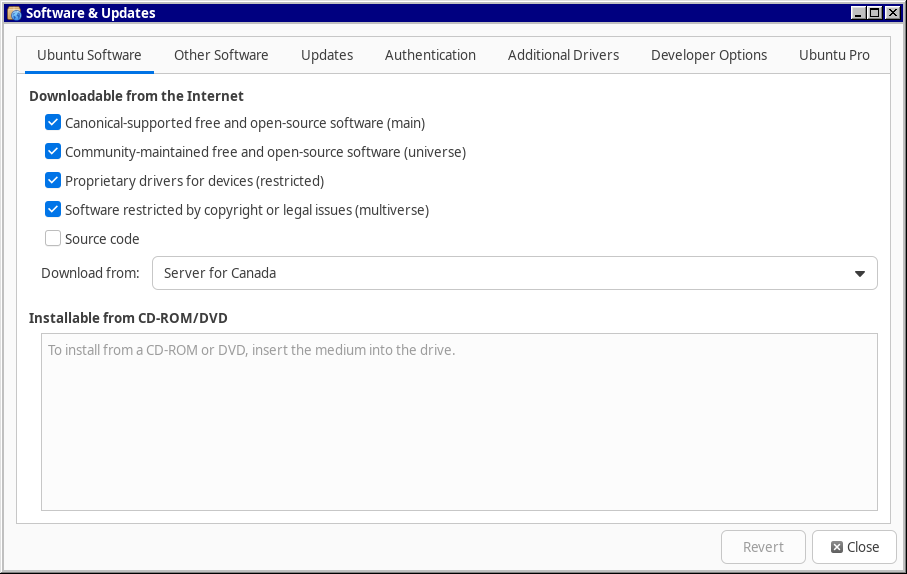
Or add it in the GUI. Currently the name of the program is Software & Updates but the name changes from time to time so it might be something else.
Under the "Ubuntu Software" tab there should be a checkbox for "Community-maintained free and open-source software (universe)". Make sure this is checked.